Desktop marketing software · Founding release

A week of pizza content, drafted by Pep. Approved by you.

Pizza Promo Pro is a desktop app for independent pizza shops. Pep, the AI teammate built into it, learns your real menu and promotions, drafts platform-ready posts and visuals, and proposes every change as a card you confirm. Nothing goes out without your say-so.

  • One-time purchase
  • Bring your own AI
  • Runs on your computer
  • Human approval stays on
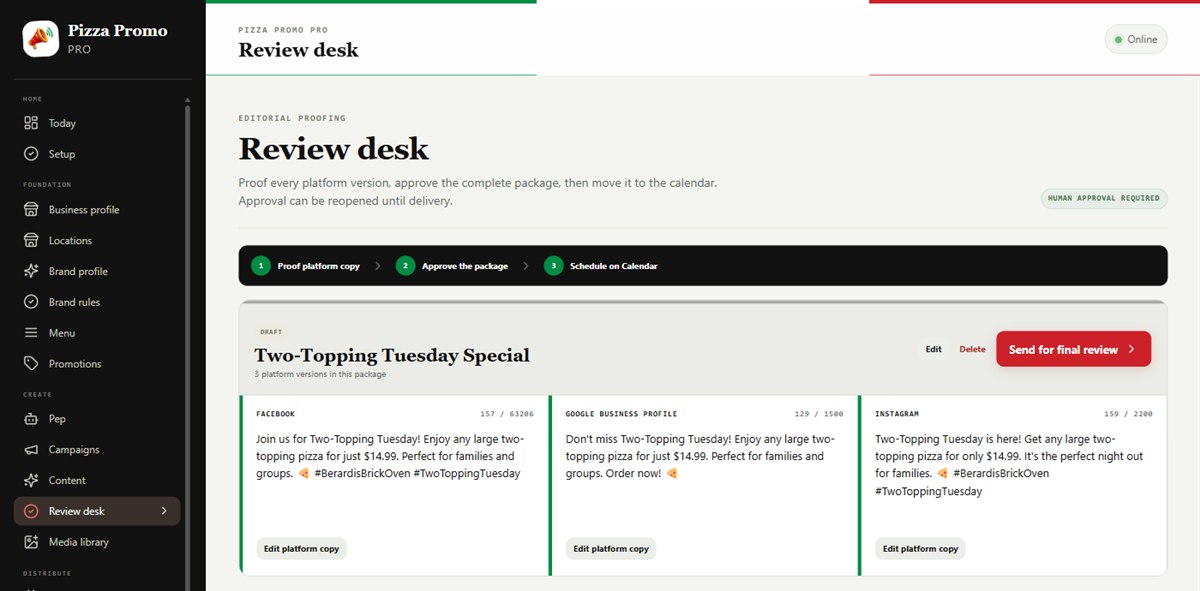
Review desk
The Review Desk in Pizza Promo Pro showing Facebook, Google Business Profile and Instagram drafts for a Two-Topping Tuesday promotion, each with a character count, ready to approve

Built for the owner who handles the ovens, the team, and the marketing.

Native desktop appNo SaaS subscriptionHuman approval stays on

Meet Pep

An assistant that does the work, and asks before anything changes.

Pep reads what you’ve actually saved: your menu with real prices, your running promotions, what’s waiting in review, what’s on the calendar. Ask him anything and he checks instead of guessing.

When you want something done, he proposes it: a promotion, a menu item, a week of drafts, a calendar slot. Each one becomes a card in the chat. Nothing is saved until you tap Confirm.

Pep can never approve content, publish a post, spend money, or touch your accounts. Those stay yours.

  • Reads your real data
  • Proposes, never acts
  • Knows every help guide
PepClaude · your key

Tuesdays are dead. Give me a promotion I can run for the next month.

Checked the menu · Checked the promotions

Your two-topping large is $18.50 and nothing runs on Tuesdays yet. Here’s a deal built on that. It’s ready to confirm, and I can draft the posts once it’s saved.

Create promotion “Two-Topping Tuesday”
  • Any large two-topping for $14.99, dine-in or pickup
  • Runs Sep 8 – Oct 6, Tuesdays only
  • Coupon code TUESDAY
ConfirmDismiss
Nothing happens until you confirm.
Ask Pep anything…

The content prep line

From the first question to the calendar, with you in control.

Setup used to be an afternoon of forms. Now it’s a short conversation. After that, AI helps with the work and never makes the final decision.

  1. 01
    Set up with Pep

    Answer a few plain-English questions about your shop, location, and what makes your place different. Pep fills in the records, including signature menu items with real prices, or imports your public menu from Clover, Square, Slice, or Toast. Every answer is a card you confirm.

  2. 02
    Give the AI useful direction

    Describe the goal in one sentence. Your own provider — OpenAI, Claude, or a free local model through Ollama — turns that direction and your saved facts into a distinct draft for every platform you picked.

  3. 03
    Create visuals that fit your pizza

    Send a dedicated image or video prompt to Higgsfield or fal.ai, pick the model, see the cost before anything is charged, and add real photos of your food, storefront, or packaging as references where the model supports them.

  4. 04
    Proof, approve, and plan

    Edit every version at the Review Desk, reopen anything that needs work, approve the complete package, and place it on the calendar.

One working system

A working production line—not another empty AI chat box.

Content Producer

Turn strategy into actual posts.

The producer separates campaign thinking from finished copy, carries the audience, offer, voice, and call to action forward, then writes a distinct version for every selected platform.

Build Friday’s BOGO campaign for busy families3 platforms
Review Desk

Proof it. Change it. Reopen it.

Edit platform copy, check character limits and fact warnings, approve the package, or reopen it before scheduling. Approval is a checkpoint—not a trap.

INSTAGRAMReady for your decisionCopy and visual held for approval
Real menu import

Build from what you actually sell.

Preview menu items from public Clover, Square, Slice, Toast, and compatible menu pages. Prices are never guessed, and nothing enters your records until you approve it.

Higgsfield + fal.ai visuals

Give the model more than a caption.

Separate image and video direction, a choice of models, the exact cost quoted before you approve, and up to four real-world reference images where the model supports them.

Calendar + delivery

Know what moves next.

Every package shows its stage and next action. Approved work moves to a real month calendar; provider-supported publishing remains supervised, and a manual handoff is available where direct access is not.

Help Center

Twelve plain-English guides. Pep has read them all.

Connecting a provider, importing a menu, reviewing, scheduling: every guide lives inside the app. Ask Pep “how do I connect Higgsfield?” and he answers from the same page, then takes you to the right screen.

Bring the tools you choose

Your AI for the words. Your pick for the visuals.

Pizza Promo Pro is the production workspace between your shop information and the services you already choose to use.

WRITE + PLANOpenAI or Claude

Use your own API account. Claude handles Pep’s tools best.

WRITE + PLAN LOCALLYOllama

Run models on your own computer for free. Tool-capable models like Qwen 2.5 give Pep his full toolkit.

IMAGE + VIDEOHiggsfield

Sign in with your browser, pick a model, review the credit estimate, approve the prompt.

IMAGE + VIDEOfal.ai

Per-generation dollar quotes up front, and the exact billed cost recorded after every run.

You pay each provider directly for what you use. Pizza Promo Pro never hides paid generation behind an automatic button.

Software you own

Buy the workspace. Bring the services you choose.

One-time license

No monthly Pizza Promo Pro subscription added to your overhead. One year of feature updates included.

Your AI account

Choose OpenAI or Claude, or keep AI local with Ollama. Keys are encrypted on your computer and never leave it except to the provider you picked.

Your publishing decisions

Generated work stays in review until you approve it. Direct connections are enabled only where a platform’s supported API permits them.

Founding release

Put your next week of content on the line.

Get the native Pizza Promo Pro desktop application at half the planned standard price. You keep permanent access to the version you purchase—there is no recurring Pizza Promo Pro fee, and desktop updates arrive automatically during the included update period.

  • One location
  • Activate on 2 computers
  • 1 year of feature updates
  • Pep included
  • Bring your own AI provider
AVAILABLE NOWFounding license$149 once

One location · Two computers · First 50 customers

AFTER FOUNDING RELEASEStandard license$299 once

One location · Two computers

AVAILABLE NOWMultiple unit license$499 once

Up to three locations · Four computers · Each location keeps its own menu, brand, and social accounts

Buy the multiple unit license

Your software keeps working. The license includes one year of feature updates. Future major-version upgrades are optional and planned at $99; critical fixes continue for the supported version.

Straight answers

Before you put it on the tab.

What can Pep actually do?

Pep answers questions about your saved data and the built-in guides, takes you to the right screen, and proposes real work: promotions, menu items, content drafts, calendar slots, and your whole first-time setup. Every proposal is a card you confirm. He can never approve content, publish, spend money, or touch your accounts and keys.

Do I need to be technical?

No. Setup is a conversation—Pep asks plain questions about your shop and fills in the records for you. The one technical-sounding step is connecting an AI provider, and the Help Center walks through each option, including the free local one.

Does it include an AI subscription?

No. You choose and connect a supported AI provider, or use Ollama locally at no cost. Any provider usage charges are paid directly to that provider.

Is Pizza Promo Pro a browser application?

No. It is a native desktop application designed to run locally on your computer, and your shop data stays on that computer.

Can it connect to my social accounts?

Direct account access depends on each platform’s supported API and authorization process. Pizza Promo Pro keeps those connections separate, shows their capability clearly, and provides a manual handoff path when direct publishing is not available.

Does it create images and video?

Pizza Promo Pro can send supervised image and video jobs to Higgsfield or fal.ai using your connected account. You choose the model, review the prompt and estimated cost, optionally select compatible reference images, and approve the spend before generation begins.

Can it import my existing menu?

It can preview items from public Clover, Square, Slice, Toast, and other compatible menu pages. Some sites may restrict automated access. Nothing is saved until you review the preview, and prices are never guessed.

What happens after the first year?

The version you purchased keeps working. You are never forced into a Pizza Promo Pro subscription. Future major-version upgrades are optional and planned at $99.

How many locations and computers are included?

The founding and standard licenses cover one location and two computers. The $499 multiple unit license covers up to three locations and four computers.

Each location is set up on its own, with its own menu, prices, promotions, and social accounts, so a post for one store never carries another store’s prices or address. When you add a location you can copy the menu, brand, and promotions across instead of retyping them, and you can send one content idea to your other locations and have it rewritten from each one’s own saved facts.

Inside the app each location is called a shop, and you switch between them from the sidebar.